WordPress 6.9 “Gene”, released on December 2, 2025, marks the final major update of the year. Building on 6.8 (from April 2025), it emphasizes collaboration, editor refinements, performance tweaks, and developer tools preparing for future AI integrations.
While many sites upgrade smoothly with noticeable improvements, early reports highlighted compatibility issues—largely resolved by mid-December patches and a planned 6.9.1 maintenance release.
This article examines the **pros** and **cons** of upgrading from 6.8.3 to 6.9, drawing from official release notes, community feedback, and real-world testing as of late December 2025.
*The official WordPress 6.9 release announcement highlights collaboration and performance gains.*
Key New Features in WordPress 6.9
WordPress 6.9 refines the block editor and Site Editor:
– **Block-Level Notes** → Editors add private comments directly on blocks for team feedback (like Google Docs inline comments).
– **Expanded Command Palette** → Now dashboard-wide (Ctrl/Cmd + K) for quick navigation and actions.
– **New Core Blocks** → Accordion, MathML, Time-to-Read estimate, separate Comment Count/Link blocks.
– **Block Visibility Controls** → Hide blocks on frontend while keeping them editable.
– **Improved Drag-and-Drop** → Live previews and better handles.
– **Safer Theme Switching** → Preserves custom templates and styles.
– **Developer APIs** → Enhanced Interactivity API, new Abilities API (AI groundwork), Block Bindings extensions.
Performance gains include on-demand CSS loading (especially for classic themes), optimized cron jobs, and script prioritization—yielding 5-15% better Core Web Vitals on average.
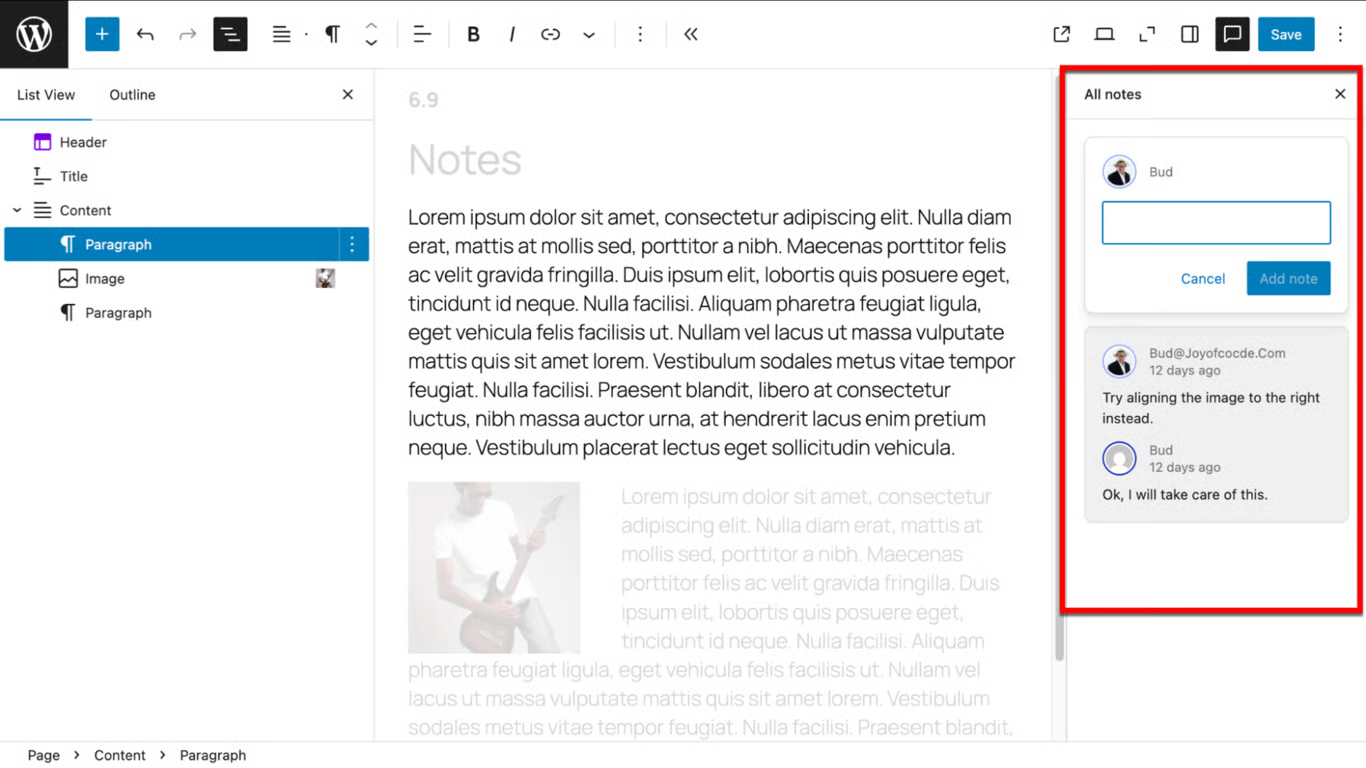
*Block-level Notes enable seamless team collaboration directly in the editor.*
Pros of Upgrading to WordPress 6.9
### 1. Enhanced Collaboration and Workflow
Teams benefit most from **Notes**—no external tools needed for reviews. The global Command Palette speeds navigation, ideal for power users.
*The Site Editor in 6.9 offers refined tools for hiding blocks and managing templates.*
### 2. Better Design and Content Tools
New blocks like Accordion and Math reduce plugin reliance. Block visibility aids staging content, while improved drag-and-drop and container restrictions ensure consistency.
### 3. Measurable Performance Improvements
On-demand block CSS cuts bloat in classic themes. Other optimizations improve LCP, FCP, and TTFB without configuration—great for SEO and user experience.
### 4. Future-Proofing and Developer Benefits
Abilities and Interactivity APIs support dynamic, AI-ready sites. PHP 8.5 compatibility boosts speed up to 30% on modern servers.
### 5. Security and Stability
Fresh core updates patch vulnerabilities. Most early bugs are fixed via patches and upcoming 6.9.1.
Cons and Potential Risks of Upgrading
### 1. Early Compatibility Issues (Mostly Resolved)
Launch problems included:
– Broken layouts/CSS in classic themes + Elementor.
– High CPU spikes (e.g., WoodMart/Storefront themes due to adjacent post loops).
– Plugin conflicts with WooCommerce, Yoast SEO, Jetpack.
Patches (e.g., WooCommerce 10.4.2, Yoast 26.6) and workarounds resolved most by mid-December. Some niche setups may still need tweaks.
### 2. Learning Curve for New Features
Notes and visibility controls require adjustment. Advanced APIs may confuse non-developers.
### 3. No New Default Theme
Twenty Twenty-Five continues—no fresh starter theme for inspiration.
### 4. Potential Residual Edge Cases
Cache key changes in WP_Query affected some plugins initially. Rare issues like email delivery or navigation loops persist until 6.9.1.
### 5. Update Caution Required
Auto-updates caused downtime for some. Always backup and test in staging.
## Should You Upgrade Now?
**Yes, if:**
– You use block themes or modern plugins.
– You need collaboration tools or new blocks.
– Your site is on 6.8.3 (already outdated for security).
**Wait or proceed cautiously if:**
– You rely on classic themes with Elementor/WooCommerce.
– No staging environment available.
– Critical site during high-traffic periods.
As of December 29, 2025, most issues are addressed—upgrading is generally safe and recommended for ongoing security/support.
How to Upgrade Safely
1. **Backup everything** (database + files).
2. **Create a staging site**.
3. **Update plugins/themes first** (check changelogs for 6.9 compatibility).
4. **Update to 6.9** via Dashboard > Updates.
5. **Test thoroughly** (frontend, editor, forms, checkout).
6. **Monitor performance** with tools like GTmetrix or PageSpeed Insights.
If issues arise, rollback using WP Downgrade or restore from backup.
Conclusion
WordPress 6.9 delivers practical enhancements in collaboration, usability, and speed—making it worthwhile for most users. Early bugs were notable but quickly fixed, typical for major releases.
Staying updated ensures security, performance, and new capabilities. If your setup is stable on 6.8.3 and doesn’t need new features, wait for 6.9.1 in early 2026.
For the majority, especially block-based sites, upgrading to 6.9 brings meaningful improvements without major downsides.

*The expanded Command Palette in 6.9 speeds up dashboard navigation.*
*Sources: Official WordPress.org release notes, Make/Core Field Guide, community forums, and developer blogs (December 2025).*